


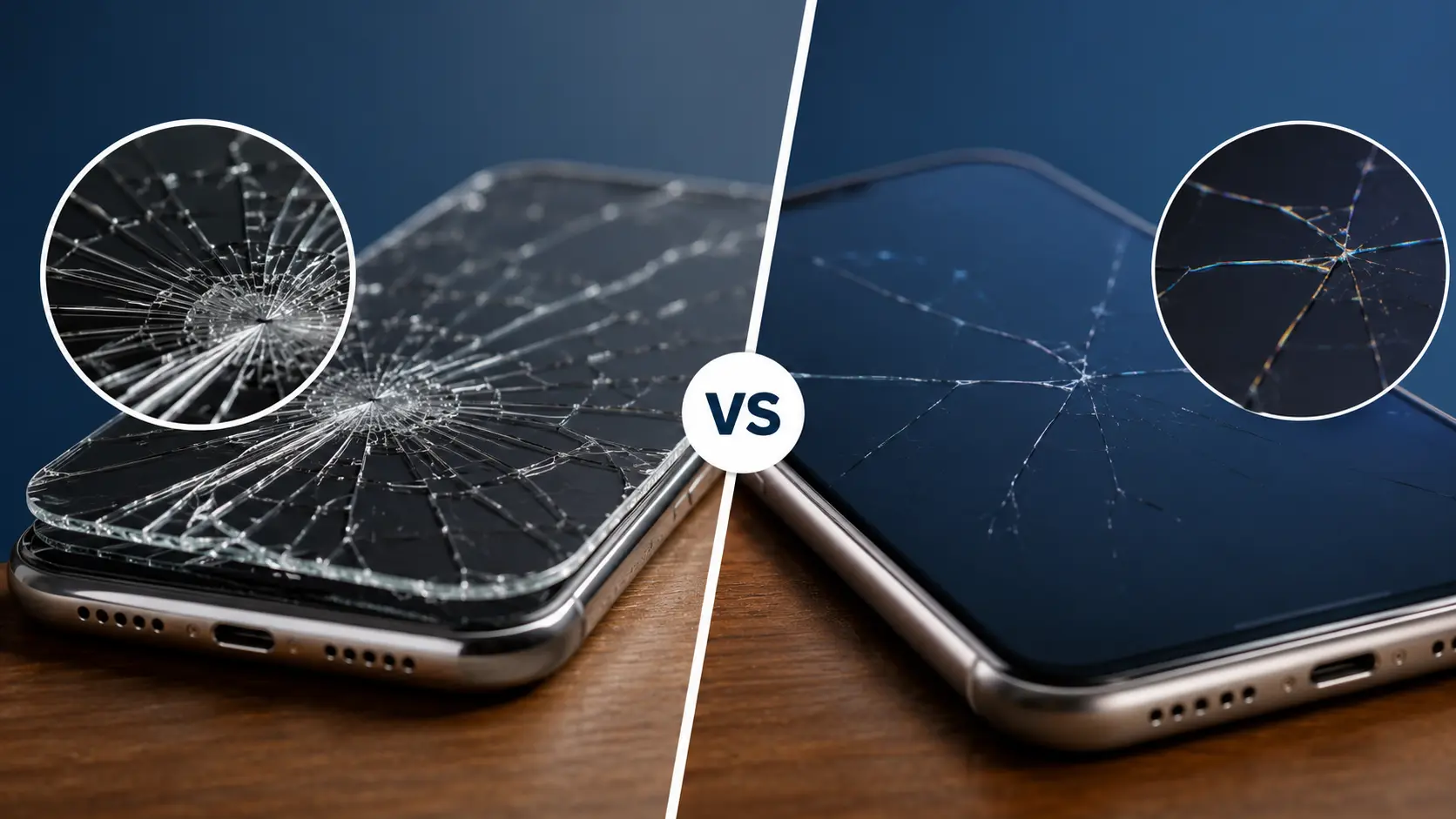
Is It the Screen Protector or the Actual Screen?
You dropped your phone. There’s a crack. But before you assume the worst, there’s a good chance the damage is only on your tempered glass protector, not the display underneath. The difference determines whether you need a cheap replacement protector or a professional screen repair.
Run Your Finger Across the Crack
Drag your fingertip slowly across the cracked area. If your finger catches on the crack and you feel a physical ridge, the damage is most likely on the surface layer (your screen protector). Tempered glass protectors sit on top of the display, so cracks in them are raised and rough to the touch.
If the surface feels smooth but you can still see the crack underneath, the damage is on the actual phone screen. The protector may even be intact while the display beneath it is fractured.
Use a Flashlight at an Angle
Hold a flashlight at a low angle across the cracked area and tilt it slowly. If the crack catches the light only at certain angles and looks shallow, it’s likely on the tempered glass. If the crack appears deep, produces a shadow, or seems to sit below the surface, your actual screen has the damage.
Try Peeling a Corner of the Protector
Carefully lift one corner of the screen protector using your fingernail. If the crack lifts with the protector and the screen underneath looks clean, you’re in the clear. If the crack remains on the display after you lift the protector, the phone screen itself is damaged.
Be gentle. If the screen is cracked, pressing too hard on the protector can push glass fragments into the display.
Check for Display Problems
Tempered glass cracks are cosmetic. They don’t affect what you see on your screen. But if you notice black spots or dark patches, colored lines (green, pink, or white) running across the screen, flickering or unresponsive touch areas, or the screen going completely black even though the phone vibrates, these are signs of LCD or OLED panel damage. A new protector won’t fix this. The display itself needs to be replaced.
Why Cracks Spread (and Why Waiting Makes It Worse)
A hairline crack might look minor, but phone screens are under constant stress from daily use. Tapping, swiping, and the heat generated by your phone’s processor can cause cracks to spread over time. If you’re wondering whether it’s safe to keep using a phone with a cracked display, we’ve covered that in detail in our guide on using a phone with a cracked screen.
Dust and moisture can work through even hairline fractures and damage internal components. In Albuquerque’s dry, dusty climate, this happens faster than you might expect. Fine sand particles get into small fractures, and temperature swings between hot afternoons and cool evenings create thermal stress that pushes cracks further.
How to Protect Your Phone From Future Damage
Once you’ve determined whether your screen or protector is cracked (and gotten it fixed if needed), these steps will help prevent it from happening again.
Invest in a Quality Screen Protector
Not all tempered glass protectors are equal. Look for 9H hardness rating (the highest commonly available, resistant to keys and most sand particles), full-edge or full-coverage design (protectors that stop short of the edges leave a gap where dust accumulates and the glass is exposed), and oleophobic coating (reduces fingerprints and makes the surface feel smoother).
Avoid the cheapest options at gas stations or dollar stores. These are typically thinner, softer, and use weaker adhesive that peels up at the edges within weeks.
Use a Case With Raised Edges
The most important feature in a phone case isn’t thickness or brand; it’s raised bezels around the screen and camera. When the phone falls face-down on a flat surface, the raised edges make contact before the screen does, creating a buffer that can prevent the glass from hitting the ground.
Cases with corner reinforcement (thicker material at the four corners) are especially effective, since corners are where impact force concentrates during a drop.
Be Mindful of Where You Place Your Phone
Most phone drops happen in the same few situations: pulling the phone out of a pocket and fumbling it, setting it on an uneven surface where it slides off, or placing it on a car dashboard where it slides during a turn. Being aware of these patterns helps. Use a flat, stable surface. Don’t balance the phone on armrests or ledges. If you’re using the phone while walking, grip it firmly.
Avoid putting your phone in the same pocket as keys, coins, or other metal objects. Even with a screen protector, hard metal objects can scratch or pressure-crack the glass.
Avoid Extreme Temperature Changes
Glass is sensitive to rapid temperature shifts. Moving from a heavily air-conditioned building to outdoor heat (or the reverse) creates thermal stress in the glass. This alone won’t crack an undamaged screen, but if there’s an existing hairline fracture, thermal stress can extend it.
Don’t Skip Software Updates
This seems unrelated to physical protection, but OS updates often include battery management improvements. Better battery management means less heat generation, and less heat means less thermal stress on your screen glass. It’s an indirect benefit, but it’s real.
What We See at Our Albuquerque Shop
Cracked screens are the single most common repair we handle. Roughly half the people who walk in thinking their screen is broken actually just need a new tempered glass protector, which is a much cheaper fix.
We offer a free check for exactly this reason. If the protector took the hit, we’ll replace it on the spot. If it’s the actual display, we use genuine Apple screens for iPhones and premium OEM-grade panels for Samsung and other Android devices. Most screen replacements are finished in about 30 minutes.
If you want to understand the difference between screen technologies and how they handle impact differently, our guide on LCD vs OLED screens breaks that down.